Guideline Wizards
Fleischner Society 2017 Guidelines
Live DemoIs this finding applicable for Fleischner guidelines?
Fleischner guidelines apply to incidental pulmonary nodules on CT
Insert Directly Into Your Impression
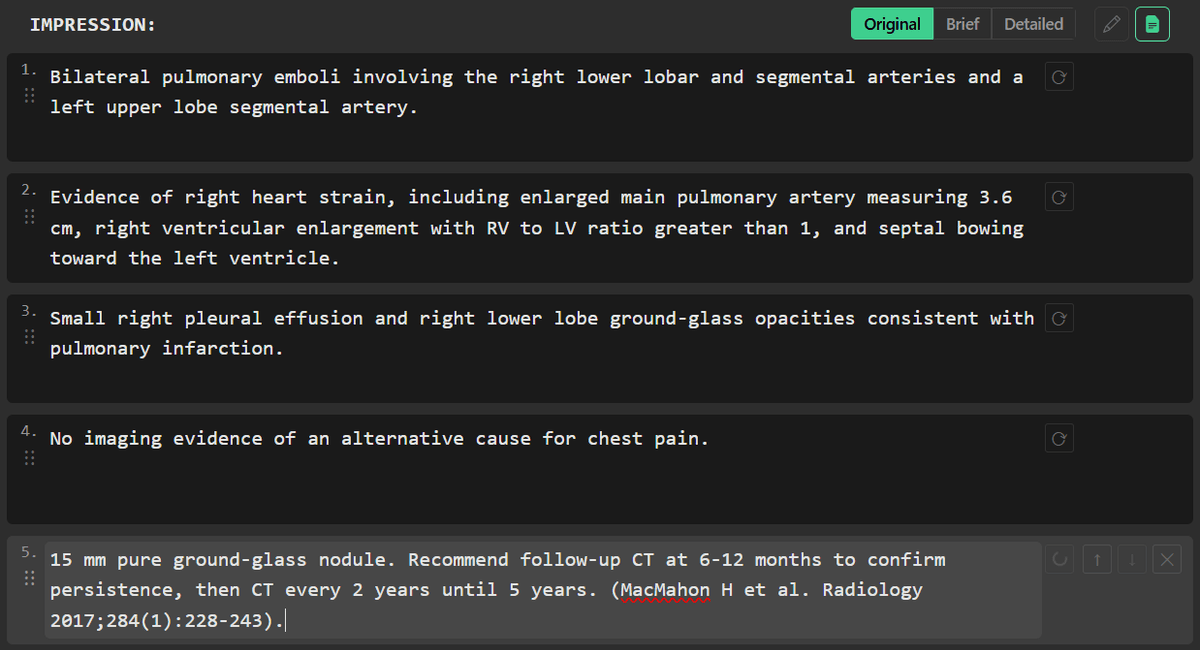
Once you walk through the wizard, the follow-up recommendation is ready to insert straight into your impression — no retyping, no copy-pasting from a browser.
One-Click Insertion
After the wizard produces a recommendation, insert it directly into your report's impression with a single click.
Guideline-Cited Language
Optionally include the specific guideline reference in the inserted text so your recommendation is properly sourced.
Edit Before or After
Modify the recommendation text before inserting, or edit it in the impression editor afterward — it's your report.
Accessible When You Need It
The guideline wizard is available directly within RadPal — no separate apps, no browser tabs. Look up a finding and get back to reporting.
In-App Access
Open the wizard from within RadPal whenever you encounter an incidental finding during dictation.
Concise Summaries
Get clear, actionable follow-up recommendations without wading through full guideline documents.
Consistent Recommendations
Standardize your follow-up language across reports by referencing the same guideline source.
Example Lookup
8mm solid lung nodule, high-risk patient:
Follow-up CT in 3 months recommended (Fleischner Society)
Covered Finding Types
Guideline Wizard
Evidence-based follow-up guidance at your fingertips
Multiple Organ Systems
Coverage of incidental findings across lung, liver, kidney, adrenal, pancreas, adnexal, and more.
Quick Lookup
Search by finding type and characteristics to get recommendations in seconds.
Guideline-Based
Recommendations based on published Fleischner, ACR, and SRU guidelines.
Risk Stratification
Guidance adjusted for patient risk factors when applicable.
Actionable Output
Clear, concise recommendations you can reference directly in your reports.
In-App Access
No browser tabs needed — access guidelines without leaving RadPal.