Report Templates

RadPal comes with default templates and lets you create your own for any exam type. Each template carries its own metadata and custom rules — so your reports come out the way you want.
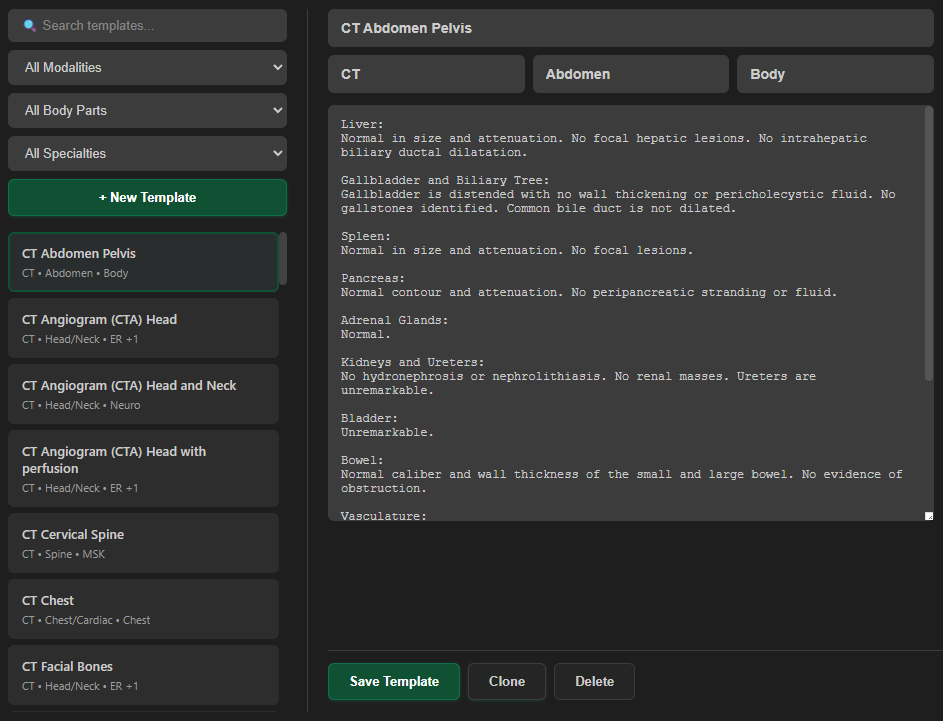
Report Templates

Per-Template Custom Rules

Tell the AI how you want your reports written. Add plain-language rules to any template and RadPal follows your instructions during generation. Create your own or customize the defaults — your style, your preferences, your way.

Findings Rules

Control how the findings section is structured and formatted — specific to this template. For example, "always specify tear location using clock-face notation."

Impression Rules

Control the style and content of the generated impression — like "list findings in descending order of clinical significance" or "avoid overly detailed measurements unless they change management."

Logic Transfer

Import or export content, metadata, or custom rules between templates. Quickly propagate settings across your library.

Template Custom Rules

Findings Rules

"Always specify labral tear location using clock-face notation."

Impression Rules

"When findings indicate sequelae of prior anterior shoulder instability or dislocation (e.g., Hill–Sachs lesion, anteroinferior labral tear, bony Bankart, glenoid bone loss), all instability-related findings MUST be consolidated into a single impression item beginning with: 'Sequelae of prior anterior shoulder dislocation,' followed by the specific supporting findings."

Logic Transfer

Import or export content, metadata, and rules between any of your templates.

Template Features

Everything you need to build and manage your report template library

Default Templates

Start with a set of built-in templates covering common exam types. Modify them or create your own.

Rich Metadata

Tag templates with name, modality, body part, and specialty for organized access and better AI matching.

Custom Rules

Per-template findings and impression rules that override global settings for specific exam types.

Logic Transfer

Import or export content, metadata, and rules between templates to keep your library consistent.

Smart Suggestions

RadPal suggests matching templates during report generation based on your dictated findings.

Normal Exam Templates

Dictate "Normal" and RadPal presents matching templates for direct insertion — no AI generation needed.

2
Rule Types Per Template
4
Metadata Fields
3
Transfer Options